A2: Spreadsheets Using MS-Excel
Due dates for all assignments can be found on the [main
grid] of the course webpage.
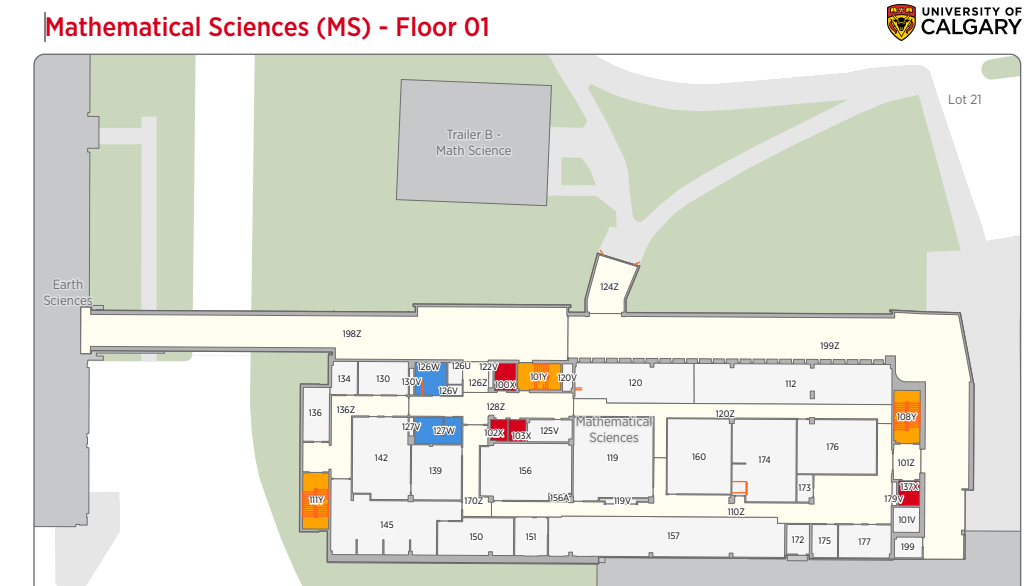
Note: The computer lab for CPSC 203 is located in MS 119 (the "Computer
Science computer lab").
If you find that your particular version of Word (e.g. Office 365, older
versions of Office, MAC users) does not include everything needed for a feature
then you should to complete that feature in MS119. You can enter the lab 24/7
but card access is required. However one of the security doors (entrance closer
to the Earth Sciences building rather than Science Theaters) should allow public
access on weekdays roughly during normal business hours. And to login to the
computers in the lab you need to [set
up your CPSC login credentials].
Alternatively login to a lab computer from your own. [Information
link created by UC-IT with modifications by James Tam, for questions: www.ucalgary.ca/it].
Keep in mind that the remote login method to a Windows computer works (I've
tested it), it is convenient (you don't have to be on campus), the process is a
bit of learning curve and sometimes operations are slow.
Data file
-
To get credit for
this assignment you
MUST use the starting data file: [grades]
Note also there are two
worksheets in
this spreadsheet.

Most of
the features in the assignment refer to the first worksheet (Overall
term grades)
so unless otherwise specified you can assume that this is the worksheet being
referred to in this assignment. This sheet contains
the fictional grade information for a CPSC 203 class and includes grade points
(which range from 0.0 - 4.3) for all course components (Columns C - K)
as well as identifying information for the student (Student ID and faculty).
Although your actual grades don't allow for a bonus (GPA > 4.0) we're making
this consistent and easier for you implement for this assignment.

Assignment features
You will start this assignment with a grade point of zero. As you implement the
features listed below your grade for this assignment will increase by the
amounts specified in the bolded text in the brackets.
-
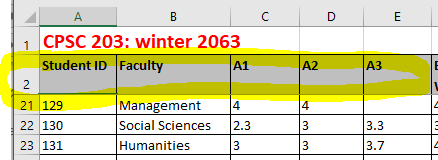
Use the "Freeze Panes" feature of Excel so the headings
on Row 2 are always visible. As you should be able to see in this image
the row above the headings will also remain 'frozen'. (Feature
is worth: 0.1 grade points)
-
Use the Excel AVERAGE() function
to calculate into Row 51 the
average grade for: each course component (Col C - K),
plus the weighted term grade point (Col L),
with the latter calculated in Feature #5. The
average should display 2 places of precision for the [rational] portion
of the grade. To
keep the rational value consistent use the feature on the ribbon to
determine the number of rational digits (Home->Number
group: Decrease/increase decimal).
Don't use functions such as
round
or the result may affect your grade because the result is different from the
marker was expecting.
(The
formula MUST be specified with relative cell references. (Feature
is worth: 0.1 grade points)
- Specify in Row 52 the
lowest grades in for each of the grading components in Col C -
Col K (plus
the weighted term grade point in Col L)
using the MIN function. The
formulas MUST be specified with relative cell references. (Feature
is worth: 0.1 grade points)
-
Specify
in Row 53 the
highest grades in for each of the grading components in Col C -
Col K (plus
the weighted term grade point in Col L)
using the MAX function. The
formulas MUST be specified with relative cell references. (Feature
is worth: 0.1 grade points)
-
Define a new formula in (Column
L)
to calculate
a weighted term grade point for each student. The value is each
component is shown below. You may want to look at the first set of notes "Introduction
to the course / administrative information"
if you don't know how to calculate a weighted term grade point. The formula
in the notes is slightly different because the simplified example doesn't
have all the components that you have this term but the idea is similar: multiply the grade point for each component by it's proportion of the term
grade. Sum all the weighted grade components to yield the term grade point.
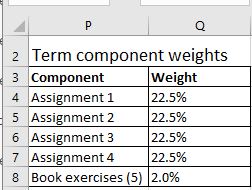
- A1 proportion of term grade = 22.5%
- A2 proportion of term grade = 22.5%
- A3 proportion of term grade = 22.5%
- A4 proportion of term grade = 22.5%
- Book exercise proportion of term grade = 10% (2% for each exercise)
When calculating the 'weight' of a component your
spreadsheet MUST use the lookup table defined in the range P2
- Q8. The references to the student
grade for each component MUST be relative and the references
to the weights in the lookup table MUST be ALL absolute.
For instance when calculating the weighted A1 grade for student with the ID
number 111 the formula will be specified as: C3*$Q$4.
The first part of the formula 'C3'
is relative because it refers to student 111's particular A1 grade. $Q$4 refers
to the part of the lookup table that
specifies the 'weight' of an assignment. Note also that the second part of
the formula ($Q$4)
is entirely defined as absolute ('dollar signs') because every student's A1
grade is worth the same weight every student's term grade
calculation will always lookup the weight from cell Q4. Additional
explanations of absolute vs. relative will be provided in lecture in the spreadsheet
notes. If you miss the classes where absolute vs. relative was covered
in lecture then should get the in-class notes (notes that students manually
take in lecture as opposed to the posted electronic slides) of a classmate
because most students find this material quite challenging. The term grade
point should display 2 places of precision for the rational portion e.g.
3.52. Again use the feature in the Excel ribbon to set the precision as you
did with the [first
feature]. (Feature
is worth: 0.45 grade points, 0.05 for each component)
-
Defines a lookup table in the worksheet ("Term
GPA Cutoffs")
Columns A - C.
(Col A specifies
the min value in each range e.g. for a 'B' grade it is 2.85. Col B specifies
the max GPA in that range e.g. for an A- the max value for this letter grade
is a grade point that is lower than 3.85. Col C specifies
the letter grades ('A', 'A-' etc.) This table specifies how various ranges
of term grade points (that
you calculated previously into the cells of "Column L") will
be mapped to a term letter grade. This
lookup table will be used by the VLOOKUP function
defined in Feature
#7 (which you will define for the next feature of this assignment) and
use the [following cut-offs]. Note these
are the same cutoffs that will be used to convert your term GPA to a letter
grade at the end of the semester for this course.
If you are unsure of how to set up a lookup table
then you can pattern your table after the examples used in the spreadsheet
notes. (Feature
is worth: 0.3 grade points: 0.025
for each letter grade x 12 letters)
-
Using the table defined in the previous feature, the
letter grade for each student will be determined using the VLOOKUP function,
the letter grade returned from this function will appear in Column M:
"Term
letter"). Similar
to Feature #5, you MUST define
the function with the absolute and relative cell references precisely as
specified here. As shown the spreadsheet
notes the VLOOKUP function
has 3 required inputs/arguments. The first input to this function refers to the cell which
contains the student's term grade point and this input MUST be
defined as a relative cell reference. The next input refers to the lookup
table you defined in Feature
#6 and it must be defined as an absolute cell reference. So for Student
111 the first two inputs of the VLOOKUP will
appear as follows L3,$A$2:$C$13.
Because the lookup table is in another worksheet the name of the worksheet
("Term GPA Cutoffs")
will appear as part of the second input so including the worksheet
information it will appear as 'Term GPA Cut
offs'!$A$2:$C$13. Finally the last input is not
a cell reference but refers to the column in the lookup table that will be
returned by the function (hint this function is supposed to return a letter
grade - if you look at the columns of the lookup table you created in the
previous feature this should give you a strong clue as to what value to
specify as the third argument). If
are still stuck then review the lectures (not just the presentation notes)
but your in class notes when I talked about how this function works. (Feature
is worth 0.6 grade points).
-
Use the COUNTIF function
to count the number of occurrences of each term letter grade. The
count of the occurrences MUST be
displayed in the 'Term
GPA Cutoffs'
worksheet in Col D.
The references to letter grades in Column M ($M$3:$M$50) MUST all
be absolute. (This
feature is worth 0.4 grade points).
-
Plot the distribution of grades using an Excel 'column chart' to display the
number of occurrences of each term letter grade. This chart should be
located in the 'Term
GPA Cutoffs'
worksheet located approximately in the area from G2 to N17.
Don't locate your chart too far from this area otherwise you marker may have
trouble locating it and your grade may be affected. The title of the chart MUST be "CPSC
203: winter 2063".
(This
feature is worth 0.15 grade points).
-
Using the
"Data validation" feature of Excel to ensure that users do not enter any
grade points outside of the range from 0 - 4.3. (providing
this error
prevention mechanism is worth 0.4 GPA) The
only cells that this protection applies to ranges from C3 - K50.
Even though in the actual calculation of your grades this semester the
programming assignments are the only ones to allow a bonus (> 4.0) grade, to
simplify the assignment the valid range including the possibility of a bonus
will apply to all graded components.
(If there is an exam component for this version of the course: The grades
for the exam components on this worksheet are derived elsewhere so setting a
valid range in those cells won't have any effect i.e. data validation won't
work).
For the 'Input
message' it must have the following
information: Title = "Error message before
input", Input message
= "You
are to enter
a GPA from 0 - 4.3".
(0.2
GPA in total for both pieces of information). The other options do not need
to be changed.
The 'Error
alert' (MUST have
the following information: Title
= "Error message after input" Error message = "GPA
must be in the range 0 - 4.3". (0.2
GPA in total for both pieces of information). You can keep the default
options e.g. the 'Style'
is 'Stop'.
(The
total mark for this feature is worth 0.8 grades points in total).
-
Apply the 'Conditional formatting' feature of Excel to the letter grades in
Column M.
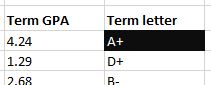
Students in the spreadsheet who are awarded a letter of 'A+" will have the cell
fill color set as black and the font color set as bolded white. In Excel
when you can select the Conditional Formatting case 'Format
cells that are EQUAL TO' under the 'with' select 'custom format'. From
there you can select the cell 'fill color' and the font color. (This
feature is worth 0.4 grade points).
-
In Column N you
are have a star '*'
appear for students who are 'stars' at programming. This MUST be
done using the AND function
(0.1 GPA) in conjunction with the IF function
(0.4 GPA). When a student in the spreadsheet has been awarded a letter grade
of A+ (GPA = 4.3) for both programming assignments (A3 & A4) a star will appear in corresponding cell.
(You make this determination by checking if the entry in Column
E
contains a
4.3
if the entry in Column
F
contains a 4.3).
If the student doesn't meet
these requirements then the cell should be left blank. (This
feature is worth 0.5 grade points).
-
Operating system specific issues:
Non-functional submissions will
receive only partial credit (if any at all).
They are extremely
unlikely to occur. Just in case it does come up here's the rule: submissions
must work on the lab computers (MS119). This the common environment used to
determine if your assignment features are truly working. That way odd cases
such as submission only working on a student's machine or the marker's
machine don't come up. It's up to you to test and check this is the
case.
- MAC
users: you can test your submission on the Windows machines in MS119.
Alternatively you can also try using [a
remote login program] to test your submissions from home.
- Caution for Windows users: take care that you
don't accidentally submit a shortcut to a file instead of the actual file.
(Check the file name and compare the file size to your original file. Simply
downloading the shortcut file as a test won't work because that shortcut
will work on your computer but not on anyone else's machine).
-
Late assignments or
components of assignments: Alternate submission mechanisms (non exhaustive list of examples:
email, uploads to cloud-based systems such as Google drive, time-stamps, TA
memories) cannot be used as alternatives if you have forgotten to submit
work or otherwise have not properly submitted into D2L. Only files
submitted into D2L by the due date is what will be marked,
everything else will be awarded no credit. The final cut off date after
which full assignments will not be accepted is after the maximum
progressive penalty (listed below) can be applied.
-
Assignment extensions:
- Because of the
possibility of a large number of illness (Covid) you may have up to 1
full assignment (A1 - A4) or up to 2 of the workbook exercises
removed from the calculation of your term grade.
If
you request an extension from me let me know the name of your tutorial
instructor and the tutorial number [link to :
tutorial and TA
information) because the markers won't accept
late submissions without directly getting an email from me and I need to
know who to contact. Also extensions need to be requested before the
due date and not afterward. You can find information about your
registration (e.g. which tutorial you are registered in) in the "Student
Center" in [PeopleSoft].
- You will not get
these special considerations (dropped graded components) for other
reasons. Details were provided during the administrative lectures [covered
during the first week of the term]
-
How you will be graded for assignments.
Feedback will be provided by the Teaching assistant in a [marking
checklist]. Besides seeing your grade point in D2L you can also see the
detailed feedback in this spreadsheet that your TA will enter for each student
because it will uploaded for each assignment into the D2L Dropbox. You can access
the grading sheet in D2L under Assessments->Dropbox and
then clicking on the appropriate assignment link. If you still cannot find
the grading sheet then here is a [help
link]
-
Questions or
concerns about grades have been released: Assignments will be marked by
your tutorial instructor (the "Teaching Assistant" or "TA") for your tutorial
section that you are officially registered in (instructor information listed here as well). When you have questions about marking
this is the first person
that you should be directing your questions towards. If you still have
question after you have talked to your TA, then you can talk to your course
(lecture) instructor but please indicate in your email that you first
contacted your TA before going into your concerns. If you don't know which
tutorial section you are officially registered in then you can find this
information in the "Student Center" via [PeopleSoft].
Collaboration:
Assignments
must reflect individual work;
group work is not allowed in this class nor can you copy the work of others.
Some "do nots" for your solution: don't publically
post it, don't email it out, don't show it to other students,
don't get help with your assignment from a tutor (if you have hired one).
For more detailed information as to what constitutes academic misconduct
(i.e., cheating) for this course please read the following [link].
Submitting your work:
-
The document must be electronically submitted using D2L.
-
Submit a modified version of the starting spreadsheet
with the above features added to it. Make sure that you do
not change the filename(s) or this will affect your grade.
-
Make
sure that you [check
the contents of your submitted files]
(e.g., is the file okay or was it corrupted, is it the correct version etc.).
It's your responsibility to do this! (Make sure that you submit your
assignment with enough time before it comes due for you to do a check). If don't
check and there were problems with the submission then you should not expect
that you can "learn your lesson" and simply resubmit.
-
Do
not use compression utilities (such as zip) or archiving utilities (such as
tar) otherwise your submission may not be marked. The space savings in D2L
is not worth the extra time required by the marker to process each
submission.
-
How often can you submit:
Multiple submissions are allowed for this assignment: You can (and
really should) submit work as many times as you wish before the due
date. Due dates are strict, only what is in D2L by the deadline is what
will be marked.
Other methods of verifying that your work was completed
on time (e.g. checking timestamps, emailed files etc.) will NOT be
accepted. However only the
latest versions of each individual document are the ones that will be
marked, everything else will be ignored (because it is not fair to your
marker to sort through multiple versions of your files).
Late
submissions for assignments when there is no extension granted: Make
sure you give yourself enough time to complete the submission process so
you don't get cut off by D2L's deadline (or your submission will be
automatically flagged as late by D2L and it will be graded appropriately)..
|
Submission received: |
On time |
Hours late : >0 and <=24 |
Hours
late: >24
and <=48 |
Hours
late: >48
and <=72 |
Hours
late: >72
and <=96 |
Hours
late: >96 |
|
Penalty: |
None |
-1 GPA |
-2 GPA |
-3 GPA |
-4 GPA |
No credit
(not accepted) |