CPSC 217: Mini-Assignment 4c
Due at 4 PM. For assignment due dates see the
main schedule on the course webpage.
The program must be written and run under python version 3.X.
New Concepts to be applied for the assignment
- File input for 2D lists
- Exception handling
Functional requirements
Unlike the full assignments you will be just
graded on program functionality for the mini-assignments.
Write
a program that consists of two functions (in addition to a
start() function).
fileRead
(Worth 3 GPA):
Synopsis: This function will read the first seven
numbers (one number for each day of the week) which are Calgary job numbers
into the each row of the list. Your program will ignore the remaining
information on that row of the input file. It will then continue reading,
line by line, job numbers into a new row of the list. (That is the list
containing the job numbers will be dynamically created with the number of
rows in the list matching the number of rows of job numbers in the input
file specified by the user when the program runs). [One
example of a possible input file]
-
Prompt the user for the name of the input file &
if the file is empty it will
display an error message. (0.5 GPA)
-
Open the input file and only read the job numbers
for Calgary into the list, other information is ignored. (2
GPA)
- If there is any problems associated with the
file (cannot open, file is empty, there is an error during the read
process) then the program will display an appropriate error message and
repeatedly prompt the user for the name of the input file and begin the file
read process anew. (0.5 GPA)
The input file contains job numbers for Calgary and
Edmonton.
- The first row is a heading and should not be
read into the list.
- The second and successive rows contains a week
of job numbers.
- There will be 7 numbers each followed by a
space for Calgary followed by a tab which is followed by 7 numbers for
Edmonton.
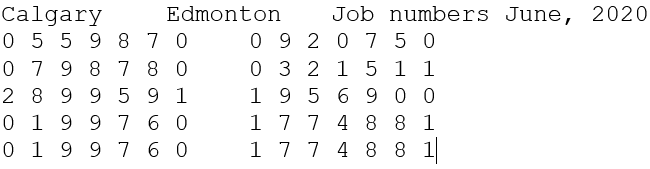
Here is the data show in the example input file.
You program must be able to handle an input file with 1 or more weeks worth
of numbers.
display
(Worth 1
GPA)
Each element of the list will be displayed with each row displayed on its
own line. (0.3 GPA)
Each element (number) will be followed by a dash. (0.3
GPA) When a row of numbers has been
displayed the total for that row will be displayed on it's own line. (0.4
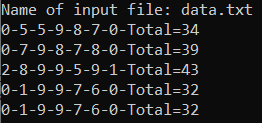
GPA) Here is the output using as input the
sample input file:
In order to make marking reasonable in order to get credit for the first
function the display function must be able to display the 2D list even if
the display function does not quite fill requirements described above. The
main thing is to get any credit for the function that reads from the file
the marker must be able to see the output of the list e.g. the following
instruction is imbedded in a loop
print(jobNumbers[i]). This latter crude
approach may allow you to be awarded credit for the file read
function (but nothing for the display function).
Hint
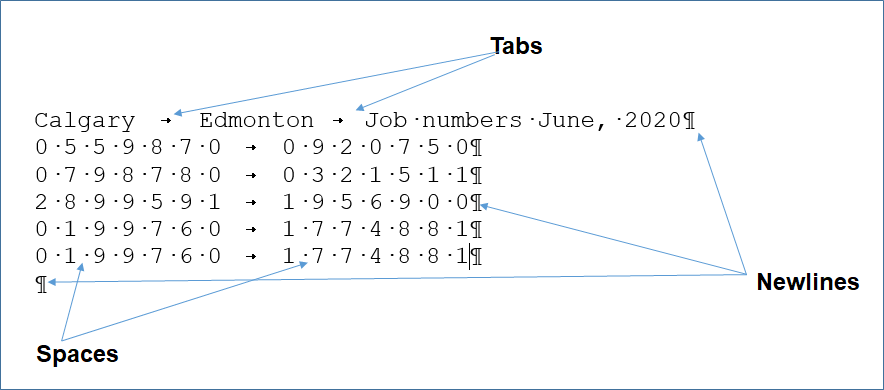
(seeing the invisible characters in a text document).
Open
the input file using Word (you should be able to access Word via the student
license for Office 365 (although the specific location in that version of Word
may be slightly different for invoking the feature to display formatting marks)
without charge while you are U of C student) and turn on 'Formatting marks'
Home
ribbon -> (Paragraph group) and click on the
Show/Hide icon
Characters that aren't visible such as spaces, tabs and the newline (enter)
appear in this display mode
Bigger hint
The TAs will cover an example called 'fileReadIntoList'
during the week of June 7 - 13 that you may find extremely useful for this
assignment and for the second part of the project. so you should make special
effort to attend tutorial that week.
- Header documentation (very top in the form of
Python documentation):
- Contact information (your name,
student identification number and tutorial number).
- What does the program do.
- What are its limitations e.g. the program doesn't
perform type checking (crashes when non-numeric information is entered).
- The version number of the program (dates are
acceptable).
- Inline documentation: list the features of each
room that were implemented in a particular function e.g. living room:
display menu options continuously, can pick up the string
- Naming conventions: You should employ good naming
conventions for identifiers (variables, constants, function names, program
file names).
- Named constants should be used as appropriate.
- The program code should have appropriate white
space (specified in the "Intro to programming lecture') and alignment
(specified throughout the lecture notes).
-
Code is self documenting e.g. Clear expressions (e.g. mathematical,
Boolean).
-
Of course if a student implements an extreme case
of inefficient code (e.g. multiple loops or branches are used when one will
do) then penalties may be applied but this is generally rare.
- Your program should follow the 5 rules of thumb
for designing user friendly software (Jakob
Nielsen's 10 usability heuristics) which were
included at the notes on 'Repetition' e.g. good error handling (such as
prompts to the user to enter the required information clearly indicate what
is required, good error messages should be provided for erroneous input)
minimizing the user's memory load, being consistent, providing clearly
marked exit & providing feedback as appropriate.
- Function specific:
Functions are one screen in length (normal screen resolution say ~30 lines
max of code (excludes whitespace and documentation).
- Function specific: Functions implement one well
defined task (e.g. processLivingRoomCommands() vs. processlivingRoomRunIntroductionRunConclusion())
- Function specific: Code in one function is not
duplicated in another function (not in the notes but this is just common
sense that you don't write two functions where there's overlapping code -
the overlap should likely be taken out of both functions and moved to
another separate function). In this assignment there may appear to be
some overlap (e.g. each room displays a menu of options but the specific
options displayed will not be identical).
- Function specific: No global variables (unless you
have a compelling reason that you have justified to the course instructor or
something explicitly allowed such as a debugging flag).
Submitting your work:
- The document must be electronically submitted
using D2L. This
applies to on-time or late submissions.
- D2L configuration for this course
- Multiple submissions are allowed for this assignment: You can (and
really should) submit work as many times as you wish before the due
date. Due dates are strict, only what is in D2L by the deadline is what
will be marked. Other methods of verifying that your work was completed
on time (e.g. checking timestamps, emailed files etc.) will NOT be
accepted.
- Multiple files can be submitted for this assignment (e.g.
A1_version1_May7, A1_version2_May8 etc.) Consequently all versions of
your submissions will be retained. However only the latest versions of
each individual document (for assignments that require multiple files to
be submitted) are the ones that will be marked, everything else will be
ignored (because it is not fair to your marker to sort through multiple
versions of your files).
- Do not use compression utilities (such as zip) or
archiving utilities (such as tar) otherwise your submission may not be
marked.
- Make sure that you [check
the contents of your submitted files] (e.g., is the file okay or was it
corrupted, is it the correct version etc.). It's your responsibility to do
this! (Make sure that your submit your assignment with enough time before it
comes due for you to do a check)
Marking
-
Assignments will be marked by your tutorial instructor (the "Teaching
Assistant" or "TA") for your
tutorial section. When you have questions about marking this is the first
person that you should be directing your questions towards. If you still
have question after you have talked to your TA, then you can talk to your
course (lecture) instructor.
-
Because this is a simple mini-assignment there isn't a marking spreadsheet.
If you were awarded full marks then you will see your grade point in D2L
(4.0). If you were awarded less than full credit then your marker will enter
some brief comments that described where you went wrong into the D2L Dropbox
for this component.
Points to keep in mind:
-
Due time: All
assignments are due at 4 PM on the due
dates listed
on the course web page. Late assignments or components of assignments will
not be accepted for marking without approval for an extension beforehand.
Alternate submission mechanisms (non exhaustive list of examples: email,
uploads to cloud-based systems such as Google drive, time-stamps, TA
memories) cannot be used as alternatives if you have forgotten to submit
work or otherwise have not properly submitted into D2L. Only files
submitted into D2L by the due date is what will be marked,
everything else will be awarded no credit.
-
Method of
submission: You
are to submit your assignment using D2L [help
link]. Make
sure that you [check
the contents of your submitted files]
(e.g., is the file okay or was it corrupted, is it the correct version
etc.). It's your responsibility to do this! (Make sure that you submit your
assignment with enough time before it comes due for you to do a check).
-
Identifying
information:
All assignments should include contact information (full name, student ID
number and tutorial section) at the very top of your program in the class
where the 'main()'
method resides (starting execution point). (Note other documentation is also
required for most assignments).
-
Collaboration:
Assignments must reflect individual work;
group work is not allowed in this class nor can you copy the work of
others. For more detailed information as to what constitutes academic
misconduct (i.e., cheating) for this course please read the following [link].
-
Execution: programs must run on the computer
science network (if applicable during that particular semester) running
Python 3.x. If you write you code in the lab and work remotely using a
remote login program such as Putty or SSH then you should be okay (assuming
you don't login to a non-Linux computer). If you choose to install Python on
your own computer then it is your responsibility to ensure that your program
will run properly here. If it won't run using Python 3.x then it won't be
awarded credit. It's up to you if you wish use the graphical program
builder IDLE to write/run your programs but if you do you submit your
program in the form of text ".py"
file or files.
-
Use of pre-created Python
libraries:
unless otherwise told you are to write the code yourself and not use any
pre-created functions. For this assignment the usual acceptable functions
include: print(), input() and
the 'conversion' functions such as int(), float(), str().
Look at the particular assignment description for a list of other classes
that you are allowed to use and still get credit in an assignment
submission.
-
Extensions may
be granted for reasonable cases by the course instructor with the receipt of
the appropriate documentation (e.g., a sworn declaration with a commissioner
of oaths). Typical examples of reasonable cases for an extension include:
illness or a death in the family. Example cases where extensions will not be
granted include situations that are typical of student life: having multiple
due dates, work commitments etc. Tutorial instructors (TAs) will not be able
to provide extension on their own and must receive permission from the
course instructor first.
-
Questions about marking: Your Teaching
Assistants will be marking the assignments so I will first direct your
questions to them regarding the marking.
-
Late submissions (no extension granted):
|
Submission received: |
On time |
Hours late : >0 and <=24 |
Hours
late: >24
and <=48 |
Hours
late: >48
and <=72 |
Hours
late: >72
and <=96 |
Hours
late: >96 |
|
Penalty: |
None |
-1
GPA |
-2
GPA |
-3
GPA |
-4
GPA |
No |