CPSC 217: Assignment 3 ("The Dungeon of Doom":
the Inner Sanctum)
Due at 4 PM. For assignment due dates see the
main schedule on the course webpage.
The program must be written and run under python version 3.X.
New Concepts to be applied for the assignment
-
Decomposing a problem into functions (includes concepts such as parameters,
return values, local variables/scope)
Functional requirements (for the marks allocated for
each feature see the marking spreadsheet)
This program begins in inner sanctum of the house (the
living room). The player has solved the puzzle for first part of the game and
passed through the door in the entryway with the inner door to the rest of the
house vanishing behind the player (i.e. the previous part of the house is not
accessible in this program so the Assignment 2 code is not needed for this
assignment).
You must implement your program using functions. One way of decomposing your
program is to implement the processing of instructions for a room as a single
function or multiple functions. Because there are three rooms that will mean
that your program will consist of at least 4 functions (1 per room plus a
starting function). You may be able to subdivide your program using an alternate
approach to writing 1 function per room but your program must follow good
design principles for using functions.
All instructions must be enclosed within the body of a function. The
exceptions could include: import statements (not really needed for this
assignment), the creation of global constants (or a global debugging flag) and
the call to the initial start or main function. You
will be penalized heavily if functions are not used or improperly used.
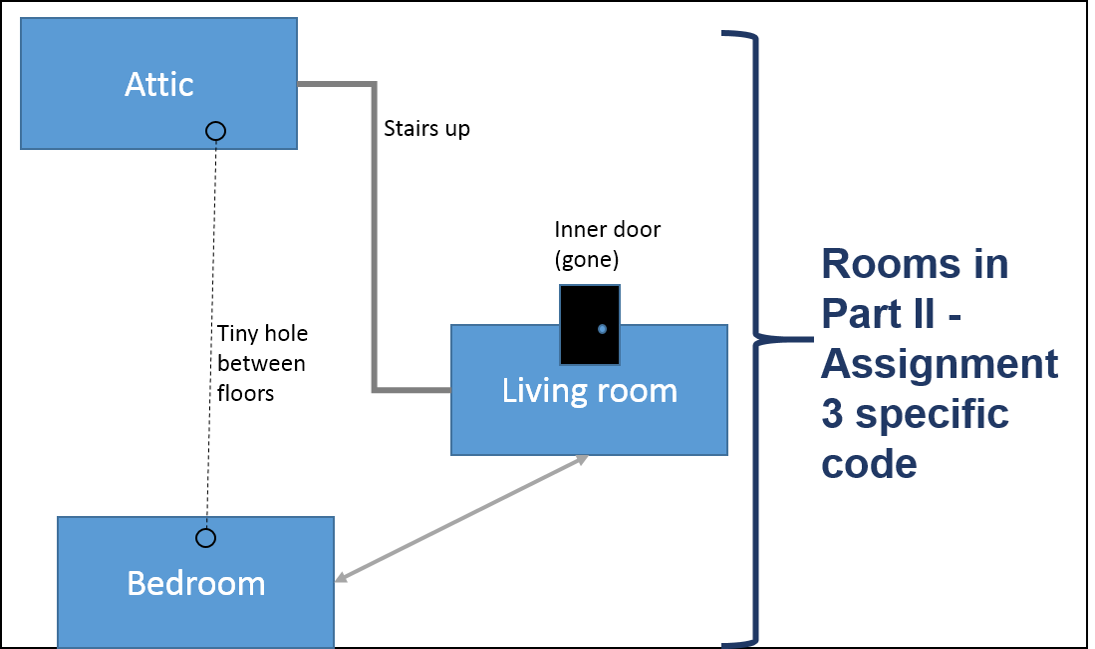
Living room contents: a
pot of soil, stairs going up, a dark entranceway, a ball of a string
- Viewing the pot of soil: 1) Default state when
viewed, it looks dry 2) After it's been fertilized by the mouse (from
the bedroom), when the player views the pot again a vine will grow that
takes the player to paradise (game won and the program ends).
- Stairs going up: takes the player to the attic.
- Dark entranceway: takes the player into the bedroom.
- Ball of string: the player can pick up this object. There is only
one ball of string, once it has been picked up the string should not
appear again in this room.
Attic contents: a tiny hole in the
floor, an unlimited supply of cheese, stairs going down.
- Hole: 1) player can pick up some cheese and try to
drop it down the hole, the game indicates that the cheese is too big 2)
If the player has the string then a new option is provided to drop the
string down the hole. When this occurs the string should be removed from
the player's inventory (the string doesn't reappear anywhere in the
game, nor does the option to drop the string down the hole appear again
in this room).
- Cheese: player can pick some up, the supply is unlimited so
repeatedly picking up the cheese won't diminish the supply (or change
the room description). However the game should track that the player is
carrying cheese (this will allow the player to feed the mouse the cheese
in the bedroom).
- Stairs going down: takes the player back down to the living room.
Bedroom contents: a tomcat which is
intently watching a mouse hole (default), mouse (after the cat leaves).
- Tomcat: when the player isn't carrying the string no
interaction is displayed. When the player is carrying the string then
there is a option to play with the cat using the string whereby the cat
looks briefly at the player and then goes back to watching the mouse
hole (the motion isn't enough to distract the cat).
- Mouse: after the player drops the string down the hole from the
attic the large motion distracts the cat sufficiently enough to leave
the room taking the string with him. The mouse then comes out of its
hole. Only if the player is carrying some cheese will the game display
an option to feed the cheese to the mouse. When this occurs the mouse
will leave the room and fertilize the pot of soil. (The vine will
grow and the player will only win the game when the soil is viewed again
from the living room). After fertilizing the soil the mouse will return
to the room so there is the possibility of the player repeatedly feeding
the mouse (the amount feed to the mouse is negligible so it doesn't
change the amount carried by the player). If the player hasn't
picked up any cheese then the room description should show that the
mouse is in the room but there is no option to interact with it.
- Dark entranceway: takes the player into the living room.
As was the case with the previous assignment each room will provide a
description of the contents, display a menu of options (which varies
depending upon the actions of the player), get and error check the player's
selection as long as the player remains in the room.
Game walkthrough: because this program is more complex than the previous
one the summary map cannot provide details of what the player needs to do in
order to win the game. Instead this step-by-step walkthrough specifies
what's needed:
- Living room: Pick up the ball of string.
- Living room: go up the stairs to the attic.
- Attic: drop the string down the hole.
- Attic: pick up some cheese.
- Attic: go down the stairs back to the living room.
- Living room: go through the dark entranceway to the bedroom.
- Bedroom: Feed the cheese to the mouse.
- Bedroom: go through the dark entranceway back to the living room.
- Living room: view the pot of soil (and win the game).
You can find sample outputs of my solution to this assignment in D2L under:
Content->Links to assignments->Assignment 3 sample outputs
In addition to grading on whether the above functionality was correctly
implemented TAs will also look at
documentation and style.
- Header documentation (very top in the form of
Python documentation):
- Contact information (your name,
student identification number and tutorial number).
- What does the program do.
- What are its limitations e.g. the program doesn't
perform type checking (crashes when non-numeric information is entered).
- The version number of the program (dates are
acceptable).
- Inline documentation: list the features of each
room that were implemented in a particular function e.g. living room:
display menu options continuously, can pick up the string
- Naming conventions: You should employ good naming conventions for
identifiers (variables, constants, function names, program file names).
- Named constants should be used as appropriate.
- The program code should have appropriate white
space (specified in the "Intro to programming lecture') and alignment
(specified throughout the lecture notes).
-
Code is self documenting e.g. Clear expressions (e.g. mathematical,
Boolean).
-
Of course if a student implements an extreme case
of inefficient code (e.g. multiple loops or branches are used when one will
do) then penalties may be applied but this is generally rare.
- Your program should follow the 5 rules of
thumb for designing user friendly software (Jakob
Nielsen's 10 usability heuristics) which were
included at the notes on 'Repetition' e.g. good error handling (such as
prompts to the user to enter the required information clearly indicate what
is required, good error messages should be provided for erroneous input)
minimizing the user's memory load, being consistent, providing clearly
marked exit & providing feedback as appropriate.
- Function specific:
Functions are one screen in length (normal screen resolution say ~30 lines
max of code (excludes whitespace and documentation).
- Function specific: Functions implement one well
defined task (e.g. processLivingRoomCommands() vs. processlivingRoomRunIntroductionRunConclusion()).
- Function specific: Code in one function is not
duplicated in another function (not in the notes but this is just common
sense that you don't write two functions where there's overlapping code -
the overlap should likely be taken out of both functions and moved to
another separate function). In this assignment there may appear to be
some overlap (e.g. each room displays a menu of options but the specific
options displayed will not be identical).
- Function specific: No global variables (unless you
have a compelling reason that you have justified to the course instructor or
something explicitly allowed such as a debugging flag).
As mentioned your program should consist of at least 4
functions including the starting function.
Because the new learning concepts to be applied are
related to functions and tools/topics related functions
your grade will be severely impacted if you bypass the use of
these concepts in this assignment and all other subsequent assignments (or
projects if required during the semester)..
Submitting your work:
- The document must be electronically submitted
using D2L. This
applies to on-time or late submissions.
- D2L configuration for this course
- Multiple submissions are allowed for this assignment: You can (and
really should) submit work as many times as you wish before the due
date. Due dates are strict, only what is in D2L by the deadline is what
will be marked. Other methods of verifying that your work was completed
on time (e.g. checking timestamps, emailed files etc.) will NOT be
accepted.
- Multiple files can be submitted for this assignment (e.g.
A1_version1_May7, A1_version2_May8 etc.) Consequently all versions of
your submissions will be retained. However only the latest versions of
each individual document (for assignments that require multiple files to
be submitted) are the ones that will be marked, everything else will be
ignored (because it is not fair to your marker to sort through multiple
versions of your files).
- Do not use compression utilities (such as zip) or archiving utilities
(such as tar) otherwise your submission may not be marked.
- Make sure that you [check
the contents of your submitted files] (e.g., is the file okay or was it
corrupted, is it the correct version etc.). It's your responsibility to do
this! (Make sure that your submit your assignment with enough time before it
comes due for you to do a check)
Marking
-
Assignments will be marked by your tutorial instructor (the "Teaching
Assistant" or "TA") for your
tutorial section. When you have questions about marking this is the first
person that you should be directing your questions towards. If you still
have question after you have talked to your TA, then you can talk to your
course (lecture) instructor.
- As well as being marked
on whether "your program works" you will also be marked on non-functional
requirements such as style and documentation. Consequently this assignment
will include a separate [marking checklist].
Besides seeing your grade point in D2L you can also see the detailed
feedback that your TA will enter for each student. You can access the
grading sheet in D2L under Assessments->Dropbox and then clicking on the
appropriate assignment link. If you still cannot find the grading sheet then
here is a [help link]
Points to keep in mind:
-
Due time:
All assignments are due at 4 PM on the
due dates
listed on the course web page. Late assignments or components of
assignments will not be accepted for marking without approval for an
extension beforehand. Alternate submission mechanisms (non exhaustive list
of examples: email, uploads to cloud-based systems such as Google drive,
time-stamps, TA memories) cannot be used as alternatives if you have
forgotten to submit work or otherwise have not properly submitted into D2L.
Only files submitted into D2L by the due date is what will be
marked, everything else will be awarded no credit.
-
Method of submission:
You are to submit your assignment using D2L [help
link].
Make sure that you [check
the contents of your submitted files]
(e.g., is the file okay or was it corrupted, is it the correct version
etc.). It's your responsibility to do this! (Make sure that you submit your
assignment with enough time before it comes due for you to do a check).
-
Identifying information:
All assignments should include contact information (full name, student ID
number and tutorial section) at the very top of your program in the class where the 'main()'
method resides (starting execution point). (Note other documentation is also required for most
assignments).
-
Collaboration:
Assignments must reflect individual work;
group work is not allowed in this class nor can you copy the work of
others. For more detailed information as to what constitutes academic
misconduct (i.e., cheating) for this course please read the following [link].
- Execution:
programs must run on the computer science network (if applicable during that
particular semester) running Python 3.x. If you
write you code in the lab and work remotely using a remote login program
such as Putty or SSH then you should be okay (assuming you don't login to a
non-Linux computer). If you choose to install Python on your own computer
then it is your responsibility to ensure that your program will run properly
here. If it won't run using Python 3.x then it
won't be awarded credit. It's up to you if you wish use the graphical
program builder IDLE to write/run your programs but if you do you submit your program in the form of
text ".py" file or files.
-
Use of pre-created Python
libraries:
unless otherwise told you are to write the code yourself and not use any
pre-created functions. For this assignment the usual
acceptable functions include:
print(),
input()
and the 'conversion' functions such as
int(),
float(),
str(). Look at the particular assignment description for a list of other
classes that you are allowed to use and still get credit in an assignment
submission.
-
Extensions
may be granted for reasonable cases by the course instructor with the
receipt of the appropriate documentation (e.g., a sworn declaration with a
commissioner of oaths). Typical
examples of reasonable cases for an extension include: illness or a death in
the family. Example cases where extensions will not be granted include situations
that are typical of student life: having multiple due dates, work
commitments etc. Tutorial instructors (TAs) will not be able to provide
extension on their own and must receive permission from the course
instructor first.
-
Questions about marking: Your Teaching
Assistants will be marking the assignments so I will first direct your
questions to them regarding the marking
-
Late submissions (no extension granted):
|
Submission received: |
On time |
Hours late : >0 and <=24 |
Hours
late: >24
and <=48 |
Hours
late: >48
and <=72 |
Hours
late: >72
and <=96 |
Hours
late: >96 |
|
Penalty: |
None |
-1
GPA |
-2
GPA |
-3
GPA |
-4
GPA |
No |