Due at 4 PM. For assignment due dates see the main schedule on the course webpage. The program must be written and run under python version 3.X.
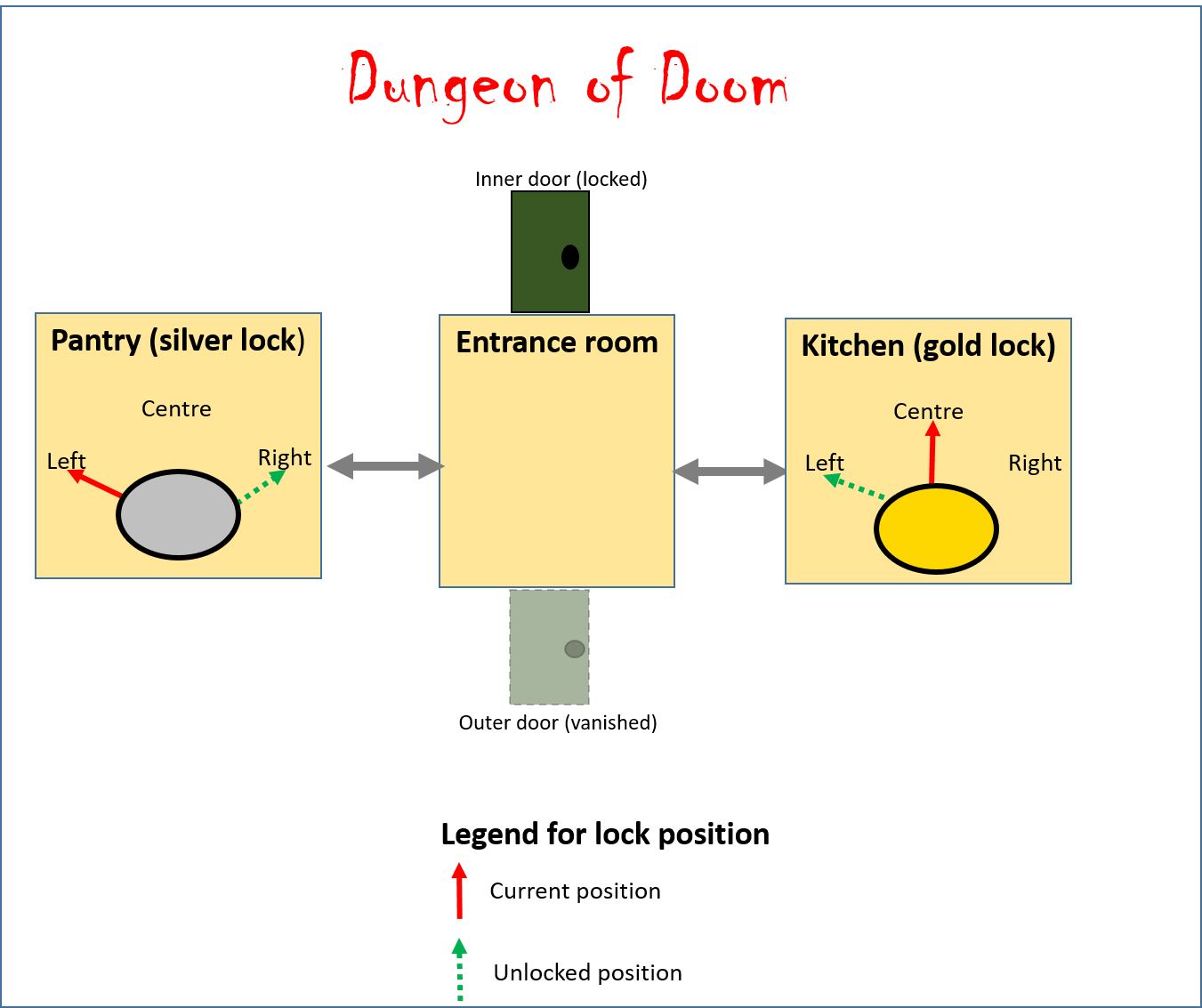
Write a text-based "choose your own" adventure game. There will be three 'rooms' in the game world, within each room the player will see a number of choices and the program will react to the player's selection. The game will repeatedly run the game via a main loop (contains most of the instructions of the program) until the game has been won. The goal of this mini-game is to open the locked door inner to access the rest of the house. When the door has been unlocked the player can return to the entrance room and open the door to the rest of the house satisfying the goal of this mini-game (which is to gain access the inner sanctum of the house). When this occurs the main loop ends and a suitable congratulatory message should be displayed.
Sample program output:
A text file "output_normal_play.txt" shows sample execution of my solution with a normal play through (no erroneous selections). Another text file "output_invalid_selections.txt" illustrates what should happen when the player selects an option that isn't listed. These files can be found in D2L under: Content->Assignment 2 decription->Sample outputs
Entrance room description
The player begins the game in the entrance. The door that brought the person into the house is gone (it's a "one-way portal"). When the player is in this room the game will describe the list of possible actions:
- Try to open the door
- Go through the left entryway
- Go through the right entryway
As mentioned the player cannot open the inner door until it as been unlocked. The player can freely pass through either entryway with no conditions. Entering a non-existent selection will result in a suitable helpful error message (refer to the last section of the 'repetition' notes, rules of thumb for how to write good error messages) and the above options are displayed again. The program does not have to handle cases where an invalid type of information (e.g. string instead of number) has been entered. (However the inability to handle invalid types should then be documented as a "program limitation"). As long as the player remains in the room the program will repeatedly display the above menu options (using a loop) after each time that the user enters his/her selection.
Pantry description
As shown in the above map the player can freely pass between the entrance and the pantry. When the player is in the pantry, the game will display the list of possible actions:
- Turn the silver lock to the left position
- Turn the silver lock to the right position
- Turn the silver lock to the center position
- Don't change the position! Return to entranceway
The program must show the current position of the lock e.g. "The silver lock is currently set to the right position.". The starting default is the 'left' position. (The unlocked position is 'right'). Similar to the entrance if the player enters an invalid selection in the pantry, a suitable and helpful error message should be displayed and the list of options for the pantry will be shown again. As long as the player remains in the room the program will repeatedly display the above menu options (using a loop) after each time that the user enters his/her selection.
Kitchen description
As shown in the above map the player can freely pass between the entrance and the kitchen. When the player is in the kitchen, the game will display the list of possible actions:
- Turn the gold lock to the left position
- Turn the gold lock to the right position
- Turn the gold lock to the center position
- Don't change the position! Return to entranceway
The program should show the current lock position e.g. "The gold lock is currently set to the center position.". The starting default is the 'center' position. (The unlocked position is 'left'. Similar to the entrance if the player enters an invalid selection in the kitchen, a suitable and helpful error message should be displayed and then the list of options for the kitchen will be shown again. As long as the player remains in the room the program will repeatedly display the above menu options (using a loop) after each time that the user enters his/her selection.
In addition to grading on whether the above functionality was correctly implemented TAs will also look at style and documentation.
Having at least one violation in one of the above 4 categories will result in -0.1 penalty to marking. Multiple violations in one category still results in a single penalty (e.g. 3 bad variable names will still result in a -0.1 penalty). However violations between categories will result in cumulative penalties (e.g. a program that includes poor variable names and no constants will receive a -0.2 penalty).
Points to keep in mind:
Questions about marking: Your Teaching Assistants will be marking the assignments so I will first direct your questions to them regarding the marking
Late submissions (no extension granted):
|
Submission received: |
On time |
Hours late : >0 and <=24 |
Hours late: >24 and <=48 |
Hours late: >48 and <=72 |
Hours late: >72 and <=96 |
Hours late: >96 |
|
Penalty: |
None |
-1 GPA |
-2 GPA |
-3 GPA |
-4 GPA |
No |