Introduction
|
|
|
| Professor John
Robert Reuel Tolkien was a faculty member at the prestigious Oxford
university. He begin work on 'The Lord of the Rings' trilogy shortly
before 'The Hobbit' was published in 1937. Although some have
labelled his books as 'adult fairy tales' there are others who made note
of the deeper metaphorical references that are used throughout his works.
Perhaps because of the rich use of metaphors in his trilogy, many continue
to draw parallels between his books and actual events in history: The Wain
riders were said
to be patterned after the Mongol invaders of Europe, The "War of the Ring"
was supposedly influenced by the events of the Second World War -
although the latter two claims were vehemently denied by Tolkien. It is a
testament to his literary genius that people today not only continue to
enjoy his work but continue to see deeper meanings. |
|
 |
| |
|
|
Assignment description
|
|
|
| For this assignment you are to
implement a two-dimensional, turn driven and
text based Lord of the Ring game that re-creates the perilous flight of
the Fellowship of the Ring in the ancient dwarven city of Khazad-dum.
The game will show an overhead view of the mines: |
|
 |
| |
|
|
 |
| |
|
|
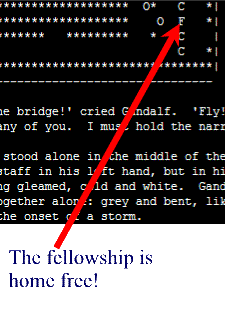
| The goal of the game
is for the player to bring the Fellowship, shown as an 'F'
in the map, from it's
starting point at the first row of the map to the bridge that leads to the
exit out of the mines. Along the way the fellowship must avoid
roving orc patrols, shown as the 'O' character as well as taking care not
to fall in any of the numerous chasms shown as 'C' or the guardhouse well
'W'. Watch out! Once the final hall is reached the dreaded
underworld demon, the Balrog, wakes and will stalk the party until either they meet their doom or
they manage to escape it's fiery clutches!
The game is turn based so time will pass in discrete intervals i.e.,
there should be a loop that repeats itself until the player chooses to quit
the game (or the win game or lose game conditions have occurred) and every
iteration of this loop will result in one turn / unit
of time passing. Each turn will be broken
down as follows:
|
| |
- The player is given the option to move (other options include
'passing' on the move or going to the cheat menu).
|
| |
- The orc patrols will move. For the sake of simplicity when you
are trying to determine if an orc can move to a empty space you can
assume that all orcs will move at the same time. (JT's hint: To
simulate simultaneous movement you can use
two arrays: a temporary array that is a copy of the main array:
one array will be used to determine which squares are currently occupied
and the other will be updated as each orc patrol moves - thus the
simultaneous movement).
|
| |
|
|
|
| |
- If the Balrog has been awoken by the party then
it will move after the orcs .
|
| |
|
|
|
| |
|
|
Grading: Working assignments
|
|
|
Features of assignments that receive a 'D+'
|
|
|
- The 2D character array that represents Moria has been declared and
initialized with the proper starting positions (as shown in the source
code fragment 'lotr.p' in the assignment directory). Your
representation of Moria must use these starting positions.
|
- After initialization the program will loop until the player chooses to
quit the game (there are no win or lose game conditions for this version
of the game).
|
- For each iteration of the loop the game will do the following:
|
| |
- The array is displayed onscreen along with the alphanumeric legend
along the left and top of the array.
|
| |
- The main menu will display two options: (m):
move the fellowship to another square, (q): to
quit the game. For this version of the assignment only the
quit game option has to work . In addition the main menu will
contain a 'hidden'
(meaning that it doesn't show up when the other menu
items are shown onscreen) cheat menu that will
shown up if option 'C' or 'c' is
selected.
|
| |
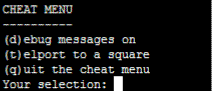
- The cheat menu will display three options: (d): Turns debugging mode
on or off (set the global variable 'debugOn' to true or false)1,
(t): teleport the fellowship. This option need not be implemented for this version of the
assignment, (q): quit the cheat menu and return to the main menu.
Note: entering and leaving the cheat menu uses a player's turn
and causes time to pass.
For this version of the assignment nothing else happens but in the fully
working version the computer controlled opponents (the orc patrols and
the Balrog) will move after the player has expended
his or her turn.
|
| |
|
|
|
| |
|
|
| 1 The effect of
turning on debugging mode is to show onscreen messages about the state of
the program that, if properly implemented, will help you debug your
program. The exact content of these messages is left to your
discretion but you can run the sample executable for some idea of how it
should work. You should be writing these debugging messages as
you implement the various functions and procedures in your program so they
can be used in testing. What you should not do is write your
whole program and then add in a few token output messages (because this
totally defeats their purpose which is to help you as
your write your code). Note using a debug
variable is the only exception to the restriction on using global
variables in your assignment submissions. You are allowed however to
use multiple debugging variables if you wish e.g., one indicates whether
the messages for the function/procedure calls show up, another determine
if the program shows information for the row/column coordinates for each
orc as it moves etc. |
| |
|
|
Additional capabilities
|
|
|
| In general you can
implement these features in whatever order or combination that you wish.
(In case of features 1, 2 & 3 it's obvious that you have to implement
the first feature before you can get credit for the others).
However in order to get any credit for these features, the cheat
menu option 't' teleport must be first implemented. Selecting this
option will allow the player to enter in a set of row/column destination
coordinates. If the destination is currently unoccupied and within
the bounds of the array, the fellowship will be magically 'teleported'
from their current location to this new destination. The reason why
I am requiring that this feature be implemented before you get credit for
any of the features below is to make it
possible for your marker to test your program in a reasonable amount of
time (e.g., rather than forcing him or her to take the time to move the
fellowship to the bridge, they can simply teleport near it and move onto
the bridge during the next turn). Also it will be
useful for you all to have the ability to quickly test the features of
your program as they are completed. Implementing
all of the features below can make you eligible to receive a grade of
'A+/4.3' (you still have to make sure that you have follow good coding
style conventions). |
| |
|
|
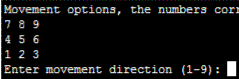
- The fellowship can move (worth 1 letter 'step's): When
option 'm' is selected at the main menu the player will be shown the
choice of movement options that are possible. The values 1 - 4 and
6 - 9 correspond to the 8 compass directions that the fellowship can
move (selecting option 5 will allow the player to pass on their move).
The program should check that the destination is within the bounds of
the array and if so then move the fellowship off of their previous
square onto the new destination square. The program should
continue prompting the player for a direction if a value outside of this
range of 1 - 9 is entered
for the direction or if the destination is outside the bounds of
the array. You do not have to check if the destination
square is occupied to receive credit for this feature.
(If the player moves onto an occupied square then it will appear that
the fellowship has 'erased' the character that was previously located
there).
|
|
|
|
|
- The program checks the movement of the player (worth 1
letter 'step'): Each time that the player moves the fellowship
the program will check that the destination square is: empty (contains a
blank space), or it contains a chasm or the well. The play should
not be allowed to move into a square that contains any other values.
If the player moves into the well or a chasm then a suitable lose game
message should be displayed and the game should end.
|
- The player can win the game by getting on the bridge over the
chasm (worth 1 letter 'step'):
When the fellowship reaches the bridge over the chasm (row 27, column
31) either by walking or teleportation, then the program will detect
that game is won and display the win game message. The game will
then end. Since the only way that the player can reach this square
(without cheating) is from the left hand side of the bridge none of the
other squares on the right hand side of the bridge should result in the
win game condition being triggered.
|
|
|
|
|
- Orcs and the Balrog can kill the fellowship (worth 1
letter 'step'); If the fellowship is ever in a square that is
adjacent to either an orc patrol or the Balrog then the fellowship has
been captured or killed and the game has been lost. A suitable end
game message should be displayed and the game should end. (JT's
hint there's a simple and efficient way of doing this - simply check the
eight squares that are adjacent to the fellowship to see if they contain
either an orc or the Balrog - just take care that when your program runs
the check that the bounds of the array are not exceeded
e.g., you shouldn't check above row one if the fellowship is currently
on that row).
|
- Orcs can move in a random fashion (worth 2 letter 'steps'):
In order to receive credit for this feature you have to make all the
orcs move to the nearest empty and adjacent square. Orcs will not
fall into the well or the chasm because they will not
move onto any squares that contain these pitfalls. To
simplify things
when you are checking if a destination square is occupied don't generate
a set of destination (row, column) coordinates that are the same as the
current coordinates (if you use the
second array to check if a square is occupied it quickly become evident
why I added this stipulation - the current square
will always show as being occupied by the orc patrol that your program
is trying to move). There is however the possibility that an
orc can become 'trapped' by other orcs in a
dead-end corridor or corner and your program will be stuck in an endless
loop because there are no adjacent squares that are empty. To get
around this problem you can simply set up a counter that increases every
time that a new set of row, column values have been generated and then
allow the orc to stay on the same square after the counter has reached a
certain value (say 100).
|
- The Balrog will activate when the fellowship reaches the entrance
to the last hall, row=29, column = 23, (worth 1 letter 'step'):
When the fellowship enters the entrance to the last dwarven hall on the
eastern most side of Moria (bottom right of the array): row 29, column
23 a message will be displayed that the Balrog has now awoken.
This means that if the next two features have been implemented then the
Balrog will actually move.
|
|
|
|
|
- The Balrog can move in random fashion (worth 1 letter
'step'): To receive credit for this feature you need to
implement a move algorithm that is similar to the one used for the orcs
above. However since there is only one creature to move you don't
need to copy the array (because in the case of the
orcs you had to have your program run as if the multiple orc patrols
moved at the same time). The Balrog will only start moving after it
has been awakened by the fellowship (so the previous feature must have
been implemented before you can receive credit for
this feature).
|
- The Balrog can chase after the fellowship (worth 1 letter
'step'): This is a different movement algorithm than the
previous one because the Balrog will attempt the move closer to the
fellowship. (JT's hint: this isn't as hard as it may first seem.
Quite simply if the fellowship is on a row above the Balrog then the
Balrog will have a destination row that is reduced by one. If
the fellowship is below then the Balrog's destination row will increase
by one. You can calculate the destination column value in a
similar fashion). If the destination (row,
column) value is not empty (i.e., there is
some sort of obstacle between the Balrog and the fellowship) then the
Balrog will move in the random fashion specified by the previous feature
so that feature must have been implemented before you can get credit for
this one.
|
| |
|
|
Grading: Non-working assignments:
|
|
|
D submissions:
|
|
|
-
The student has invested considerable time and effort into the assignment,
the program does not fulfill any of the above requirements but it does
compile.
|
| |
|
|
D- submissions:
|
|
|
-
The student has invested considerable time and effort into the assignment,
the program does not fulfill any of the above requirements and it does
not compile.
|
| |
|
|
Other submission requirements
|
|
|
- Good coding style and documentation:
They will play a role in determining your
final grade for this assignment. Your grade can be reduced by a letter
step or more if your submission was implemented using bad style
conventions (e.g., "A" to "A-" for employing poor naming conventions for
identifiers, insufficient documentation, the use of global variables
- other than the debugging variables - or
for non-modular design). See the
coding style guide for additional details.
|
| |
|
|
- Include a README file in your
submission: For this assignment your README file must indicate what
grade level has been completed (e.g., A+) as well as the specific
features that are working e.g., "I completed all the requirements of the
base level assignment plus the ability to: move the fellowship, check
for obstacles, and to win the game so this
assignment may receive a maximum grade of 'C+' for functionality."
This will allow your marker to quickly determine what he or she must
look for and speed up the marking process. Also you should
include your contact information:
your name,
university identification number and UNIX login name
so that your marker knows whose
assignment that he or she is marking. Omitting this file will result in the loss of a letter
'step'.
|
| |
|
|
- Assignments (source code 'files
that end in dot-p' and the README file) must be electronically submitted
via submit.
In addition a paper print out of the source code and README must be
handed into the assignment drop box for the tutorial that you are
registered in (located on the second floor of the Math Sciences
building). Electronically submitting the assignment allows your
marker to run the code in order to quickly determine what features were
implemented. Providing a paper printout makes it easier for your
marker to read and flip through your source code. Missing the
electronic submission will mean that your maximum grade attainable
is 'D' or 'D-' (it is very time consuming to mark assignments when you
only hand in paper submissions). Missing the paper printout will
result in the loss of a letter 'step'.
|
| |
|
|
Relevant files (Can be found in the Unix
directory: /home/231/assignments/assignment6)
|
- Sample executable: 'lotr'
|
- Source code (which you can use for
your assignment): lotr.p
|
| The Lord of the
Rings trademark is owned by
Tolkien Enterprises.
The license to the Lord of the Rings movie trilogy is owned by
New Line Entertainment.
References to either the original trademark or the inclusion of images
from the movies are for education fair use only and are not meant as a
copy write challenge. |